
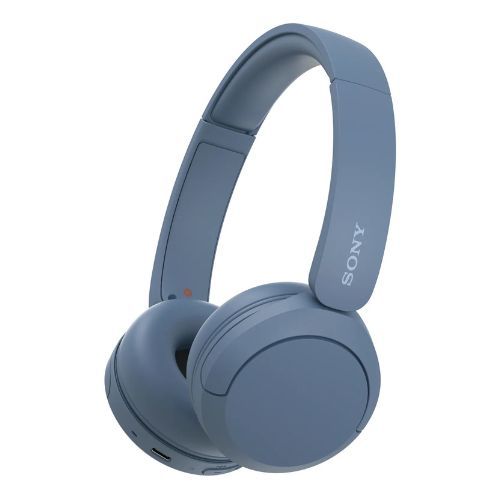
Sony - WH-CH520 (Blue) Bluetooth On-Ear Headphones
Up to 50 hours battery life
360 reality audio compatible
Manufactured using recycled materials.
Hands-free calling
Multi-point connection
Connect app and easy pair
Supports voice assistant
1 Year Warranty
ntroducing the Sony WH-CH520 Bluetooth Wireless Headphones - the perfect audio companion for your on-the-go lifestyle. With up to 50 hours of battery life and quick charging capabilities, you can enjoy your favorite tunes for even longer. The Bluetooth technology allows for seamless connectivity to your devices, while the comfortable over-ear design ensures a snug fit. Plus, the built-in microphone and remote make it easy to take calls and control your music. Upgrade your audio experience with the Sony WH-CH520 Bluetooth Wireless Headphones today. Good sound quality and customizable to your taste - Thanks to Well-Balanced Sound Tuning, EQ Custom and DSEE 360 Reality Audio Compatible Ultra long battery life - 50hrs and quick charge of 3 mins = 1.5hrs of playback Designed for comfortability - lightweight (147g), with head cushion, soft earpads, and silent joints Enjoy hands-free calling with a built-in microphone and easy controls from your headphones Connect two devices in parallel at once with a Multi-point connection Headphones Connect App and Easy Pair/Fast Pair compatible Supports Voice Assistant - Siri and Google Eco-Friendly - Recycled Plastic is Used in the WH-CH520 Headphones. Also, No Plastic is Included in the Individual Packaging With Dolby Atmos experience with BRAVIA XR through Wireless Transmitter WLA-NS7x Pairing: 1. Search for (Sony Headphones connect) on Google Play or App store 2. Launch the app. 3. Select your country/region of residence 4. Confirm the (End user license agreement) and check the (I read the above comments and agree) box. 5. Tap [Start] Setting up your Sony Headphones: Launch the "Sony | Headphones Connect" app on your smartphone/iPhone, then register your Sony headphones by following the on-screen instructions. If your headphones are wireless headphones, use method A, B or C below to register the headphones. A: Turn on the wireless headphones, then move the headphones close to your smartphone/iPhone. You can select the headphones to pair (register) with via BLUETOOTH connection. If the headphones do not appear on the screen, try the following method B or C. B: When using a smartphone/iPhone not compatible with one-touch connection (NFC), connect and pair (register) with the wireless headphones via BLUETOOTH connection using the setting menu of your smartphone/iPhone. The BLUETOOTH connection method depends on the headphones. C: When using a smartphone compatible with one-touch connection (NFC), connect and pair (register) with the wireless headphones via BLUETOOTH connection by touching the headphones with your smartphone. Refer to the operating instructions of your headphones to check whether they support the NFC functions.
| Exchange period | 60 days |
|---|---|
| Return period | 90 days |

If the product you receive is not as described or low quality, the seller promises that you may return it before order completion (when you click ‘Confirm Order Received’ or exceed confirmation timeframe) and receive a full refund. The return shipping fee will be paid by you. Or, you can choose to keep the product and agree the refund amount directly with the seller.

On-time Delivery
If you do not receive your purchase within 60 days, you can ask for a full refund before order completion (when you click ‘Confirm Order Received’ or exceed confirmation timeframe).
Warranty
Content to go hereWeek big sale